Drools rule engine
The Drools rule engine stores, processes, and evaluates data to execute the business rules or decision models that you define. The basic function of the Drools rule engine is to match incoming data, or facts, to the conditions of rules and determine whether and how to execute the rules.
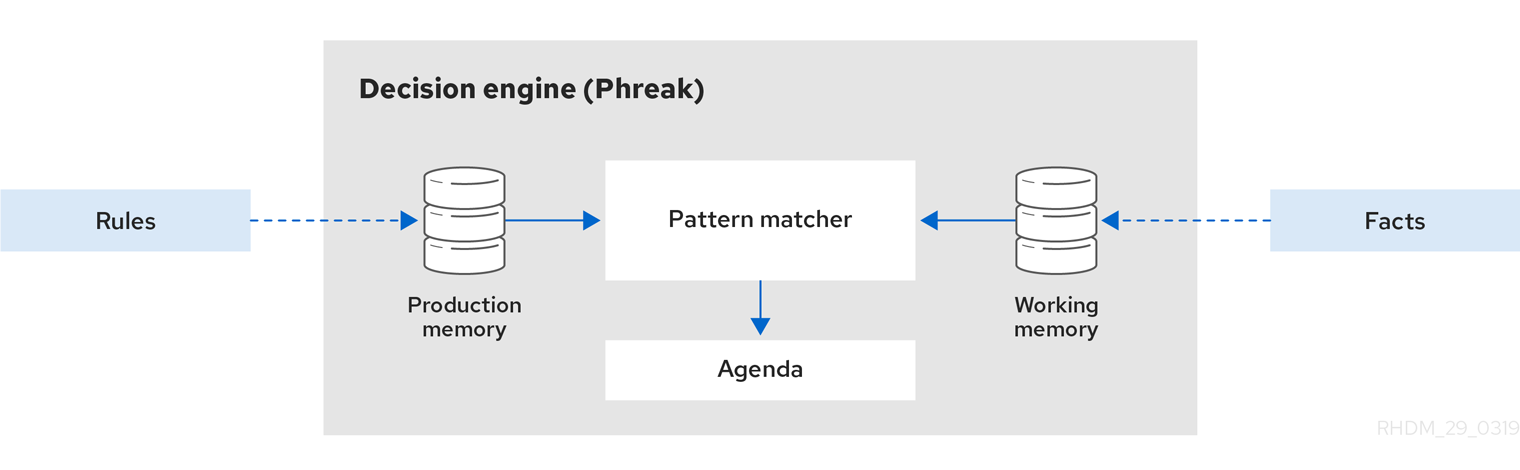
The Drools rule engine operates using the following basic components:
- Rules: Business rules or DMN decisions that you define. All rules must contain at a minimum the conditions that trigger the rule and the actions that the rule dictates.
- Facts: Data that enters or changes in the Drools rule engine that the Drools rule engine matches to rule conditions to execute applicable rules.
- Production memory: Location where rules are stored in the Drools rule engine.
- Working memory: Location where facts are stored in the Drools rule engine.
- Agenda: Location where activated rules are registered and sorted (if applicable) in preparation for execution.
When a business user or an automated system adds or updates rule-related information in Drools, that information is inserted into the working memory of the Drools rule engine in the form of one or more facts. The Drools rule engine matches those facts to the conditions of the rules that are stored in the production memory to determine eligible rule executions. (This process of matching facts to rules is often referred to as pattern matching.) When rule conditions are met, the Drools rule engine activates and registers rules in the agenda, where the Drools rule engine then sorts prioritized or conflicting rules in preparation for execution.
The following diagram illustrates these basic components of the Drools rule engine:
For more details and examples of rule and fact behavior in the Drools rule engine, see Inference and truth maintenance in the Drools rule engine.
These core concepts can help you to better understand other more advanced components, processes, and sub-processes of the Drools rule engine, and as a result, to design more effective business assets in Drools.
KIE sessions
In Drools, a KIE session stores and executes runtime data. The KIE session is created from a KIE base or directly from a KIE container if you have defined the KIE session in the KIE module descriptor file (kmodule.xml) for your project.
Example KIE session configuration in a kmodule.xml file
<kmodule>
  ...
  <kbase>
    ...
    <ksession name="KSession2_1" type="stateless" default="true" clockType="realtime">
    ...
  </kbase>
  ...
</kmodule>
A KIE base is a repository that you define in the KIE module descriptor file (kmodule.xml) for your project and contains all in Drools, but does not contain any runtime data.
Example KIE base configuration in a kmodule.xml file
<kmodule>
  ...
  <kbase name="KBase2" default="false" eventProcessingMode="stream" equalsBehavior="equality" declarativeAgenda="enabled" packages="org.domain.pkg2, org.domain.pkg3" includes="KBase1">
    ...
  </kbase>
  ...
</kmodule>
A KIE session can be stateless or stateful. In a stateless KIE session, data from a previous invocation of the KIE session (the previous session state) is discarded between session invocations. In a stateful KIE session, that data is retained. The type of KIE session you use depends on your project requirements and how you want data from different asset invocations to be persisted.
Stateless KIE sessions
A stateless KIE session is a session that does not use inference to make iterative changes to facts over time. In a stateless KIE session, data from a previous invocation of the KIE session (the previous session state) is discarded between session invocations, whereas in a stateful KIE session, that data is retained. A stateless KIE session behaves similarly to a function in that the results that it produces are determined by the contents of the KIE base and by the data that is passed into the KIE session for execution at a specific point in time. The KIE session has no memory of any data that was passed into the KIE session previously.
Stateless KIE sessions are commonly used for the following use cases:
- Validation, such as validating that a person is eligible for a mortgage
- Calculation, such as computing a mortgage premium
- Routing and filtering, such as sorting incoming emails into folders or sending incoming emails to a destination
For example, consider the following driver’s license data model and sample DRL rule:
Data model for driver’s license application
public class Applicant {
  private String name;
  private int age;
  private boolean valid;
  // Getter and setter methods
}
Sample DRL rule for driver’s license application
package com.company.license

rule "Is of valid age"
when
  $a : Applicant(age < 18)
then
  $a.setValid(false);
end
The Is of valid age rule disqualifies any applicant younger than 18 years old. When the Applicant object is inserted into the Drools rule engine, the Drools rule engine evaluates the constraints for each rule and searches for a match. The "objectType" constraint is always implied, after which any number of explicit field constraints are evaluated. The variable $a is a binding variable that references the matched object in the rule consequence.
The dollar sign ( |
In this example, the sample rule and all other files in the ~/resources folder of the Drools project are built with the following code:
Create the KIE container
KieServices kieServices = KieServices.Factory.get();

KieContainer kContainer = kieServices.getKieClasspathContainer();
This code compiles all the rule files found on the class path and adds the result of this compilation, a KieModule object, in the KieContainer.
Finally, the StatelessKieSession object is instantiated from the KieContainer and is executed against specified data:
Instantiate the stateless KIE session and enter data
StatelessKieSession kSession = kContainer.newStatelessKieSession();

Applicant applicant = new Applicant("Mr John Smith", 16);

assertTrue(applicant.isValid());

ksession.execute(applicant);

assertFalse(applicant.isValid());
In a stateless KIE session configuration, the execute() call acts as a combination method that instantiates the KieSession object, adds all the user data and executes user commands, calls fireAllRules(), and then calls dispose(). Therefore, with a stateless KIE session, you do not need to call fireAllRules() or call dispose() after session invocation as you do with a stateful KIE session.
In this case, the specified applicant is under the age of 18, so the application is declined.
For a more complex use case, see the following example. This example uses a stateless KIE session and executes rules against an iterable list of objects, such as a collection.
Expanded data model for driver’s license application
public class Applicant {
  private String name;
  private int age;
  // Getter and setter methods
}

public class Application {
  private Date dateApplied;
  private boolean valid;
  // Getter and setter methods
}
Expanded DRL rule set for driver’s license application
package com.company.license

rule "Is of valid age"
when
  Applicant(age < 18)
  $a : Application()
then
  $a.setValid(false);
end

rule "Application was made this year"
when
  $a : Application(dateApplied > "01-jan-2009")
then
  $a.setValid(false);
end
Expanded Java source with iterable execution in a stateless KIE session
StatelessKieSession ksession = kbase.newStatelessKnowledgeSession();
Applicant applicant = new Applicant("Mr John Smith", 16);
Application application = new Application();

assertTrue(application.isValid());
ksession.execute(Arrays.asList(new Object[] { application, applicant }));
assertFalse(application.isValid());

ksession.execute
  (CommandFactory.newInsertIterable(new Object[] { application, applicant }));

List<Command> cmds = new ArrayList<Command>();
cmds.add(CommandFactory.newInsert(new Person("Mr John Smith"), "mrSmith"));
cmds.add(CommandFactory.newInsert(new Person("Mr John Doe"), "mrDoe"));

BatchExecutionResults results = ksession.execute(CommandFactory.newBatchExecution(cmds));
assertEquals(new Person("Mr John Smith"), results.getValue("mrSmith"));
Method for executing rules against an iterable collection of objects produced by the Arrays.asList() method. Every collection element is inserted before any matched rules are executed. The execute(Object object) and execute(Iterable objects) methods are wrappers around the execute(Command command) method that comes from the BatchExecutor interface. | |
Execution of the iterable collection of objects using the CommandFactory interface. | |
BatchExecutor and CommandFactory configurations for working with many different commands or result output identifiers. The CommandFactory interface supports other commands that you can use in the BatchExecutor, such as StartProcess, Query, and SetGlobal. |
Global variables in stateless KIE sessions
The StatelessKieSession object supports global variables (globals) that you can configure to be resolved as session-scoped globals, delegate globals, or execution-scoped globals.
- Delegate globals: For delegate globals, you can assign a value to a global (with
setGlobal(String, Object)) so that the value is stored in an internal collection that maps identifiers to values. Identifiers in this internal collection have priority over any supplied delegate. If an identifier cannot be found in this internal collection, the delegate global (if any) is used. - Execution-scoped globals: For execution-scoped globals, you can use the
Commandobject to set a global that is passed to theCommandExecutorinterface for execution-specific global resolution.
Session-scoped globals: For session-scoped globals, you can use the method getGlobals() to return a Globals instance that provides access to the KIE session globals. These globals are used for all execution calls. Use caution with mutable globals because execution calls can be executing simultaneously in different threads.Session-scoped global
import org.kie.api.runtime.StatelessKieSession;

StatelessKieSession ksession = kbase.newStatelessKieSession();

// Set a global `myGlobal` that can be used in the rules.
ksession.setGlobal("myGlobal", "I am a global");

// Execute while resolving the `myGlobal` identifier.
ksession.execute(collection);
The CommandExecutor interface also enables you to export data using out identifiers for globals, inserted facts, and query results:
Out identifiers for globals, inserted facts, and query results
import org.kie.api.runtime.ExecutionResults;

// Set up a list of commands.
List cmds = new ArrayList();
cmds.add(CommandFactory.newSetGlobal("list1", new ArrayList(), true));
cmds.add(CommandFactory.newInsert(new Person("jon", 102), "person"));
cmds.add(CommandFactory.newQuery("Get People" "getPeople"));

// Execute the list.
ExecutionResults results = ksession.execute(CommandFactory.newBatchExecution(cmds));

// Retrieve the `ArrayList`.
results.getValue("list1");
// Retrieve the inserted `Person` fact.
results.getValue("person");
// Retrieve the query as a `QueryResults` instance.
results.getValue("Get People");
Stateful KIE sessions
A stateful KIE session is a session that uses inference to make iterative changes to facts over time. In a stateful KIE session, data from a previous invocation of the KIE session (the previous session state) is retained between session invocations, whereas in a stateless KIE session, that data is discarded.
Ensure that you call the dispose() method after running a stateful KIE session so that no memory leaks occur between session invocations. |
Stateful KIE sessions are commonly used for the following use cases:
- Monitoring, such as monitoring a stock market and automating the buying process
- Diagnostics, such as running fault-finding processes or medical diagnostic processes
- Logistics, such as parcel tracking and delivery provisioning
- Ensuring compliance, such as verifying the legality of market trades
For example, consider the following fire alarm data model and sample DRL rules:
Data model for sprinklers and fire alarm
public class Room {
  private String name;
  // Getter and setter methods
}

public class Sprinkler {
  private Room room;
  private boolean on;
  // Getter and setter methods
}

public class Fire {
  private Room room;
  // Getter and setter methods
}

public class Alarm { }
Sample DRL rule set for activating sprinklers and alarm
rule "When there is a fire turn on the sprinkler"
when
  Fire($room : room)
  $sprinkler : Sprinkler(room == $room, on == false)
then
  modify($sprinkler) { setOn(true) };
  System.out.println("Turn on the sprinkler for room "+$room.getName());
end

rule "Raise the alarm when we have one or more fires"
when
    exists Fire()
then
    insert( new Alarm() );
    System.out.println( "Raise the alarm" );
end

rule "Cancel the alarm when all the fires have gone"
when
    not Fire()
    $alarm : Alarm()
then
    delete( $alarm );
    System.out.println( "Cancel the alarm" );
end


rule "Status output when things are ok"
when
    not Alarm()
    not Sprinkler( on == true )
then
    System.out.println( "Everything is ok" );
end
For the When there is a fire turn on the sprinkler rule, when a fire occurs, the instances of the Fire class are created for that room and inserted into the KIE session. The rule adds a constraint for the specific room matched in the Fire instance so that only the sprinkler for that room is checked. When this rule is executed, the sprinkler activates. The other sample rules determine when the alarm is activated or deactivated accordingly.
Whereas a stateless KIE session relies on standard Java syntax to modify a field, a stateful KIE session relies on the modify statement in rules to notify the Drools rule engine of changes. The Drools rule engine then reasons over the changes and assesses impact on subsequent rule executions. This process is part of the Drools rule engine ability to use inference and truth maintenance and is essential in stateful KIE sessions.
In this example, the sample rules and all other files in the ~/resources folder of the Drools project are built with the following code:
Create the KIE container
KieServices kieServices = KieServices.Factory.get();
KieContainer kContainer = kieServices.getKieClasspathContainer();
This code compiles all the rule files found on the class path and adds the result of this compilation, a KieModule object, in the KieContainer.
Finally, the KieSession object is instantiated from the KieContainer and is executed against specified data: